
Exporting your connections
Administrators can download a spreadsheet of connections from the Connections page. If Xero or QuickBooks is connected, you can also send customers and subcontractors that are not yet in that app.
Opening Connection options
To export connections,
- open Connections
- choose Customers, Subcontractors or Employees
- click Connection options at the top right of the list
Export connections downloads a CSV for the tab you are on. Export to Xero or Export to QuickBooks is shown when that app is connected, and only on Customers and Subcontractors.
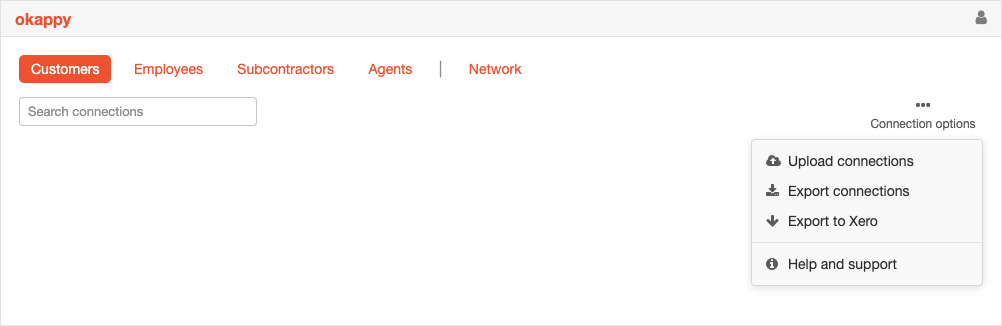
Download a CSV
Click Export connections. Okappy downloads a CSV named okappy_Customers.csv, okappy_Subcontractors.csv or okappy_Employees.csv.
For customers and subcontractors the file includes the company, accounting reference, contact, email, phone, mobile, website, address and the date the connection was created. When Xero is connected, the accounting reference is the Xero contact ID.
For employees the file includes the name, email, phone, address, whether the person is an administrator or a standard user, and the date they were added.
Export connections is not shown on the Agents tab.
Export to Xero or QuickBooks
On Customers or Subcontractors, click Export to Xero or Export to QuickBooks.
Okappy asks you to confirm. The message names how many connections on that tab are not yet linked, for example "Export 12 unlinked connections from this tab to Xero?"
Connections that already have a contact in that app are left as they are. When the export finishes, Okappy tells you how many were linked. If there is nothing to send, Okappy says "There are no unlinked connections to export."
Employees and agents are not sent to Xero or QuickBooks.
One connection
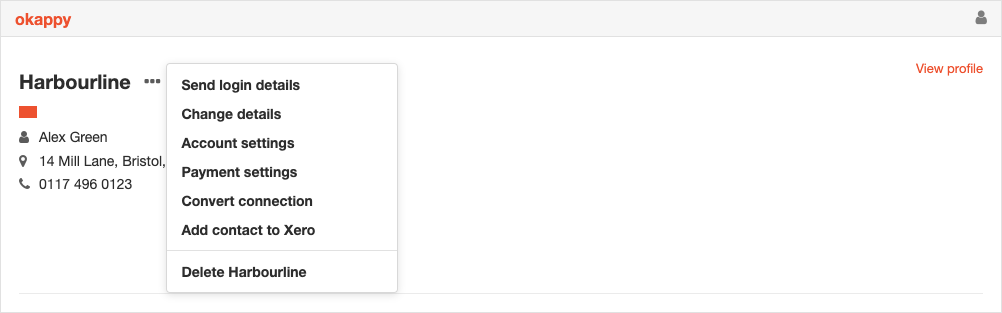
Click the three dots on a customer or subcontractor.
- If the connection is not in Xero or QuickBooks, choose Add contact to Xero or Add contact to QuickBooks. Okappy asks "Add this contact to Xero?" When it finishes, the contact is linked
- If the connection is already linked, choose View in Xero or View in QuickBooks. The contact opens in that app
Notes
- Export connections and the accounting export are shown to administrators
- Exporting a connection does not remove it from Okappy
- The CSV is the full list for that tab, not only the rows that match the search box